
Small update, big asks: edit the AI setup, buy with card, cleaner wallet
Change every value of an AI Trade before you place it, buy tokens with Apple Pay or card and auto-convert to USDC, see the fees on every closed Autopilot trade, filter your history, and a round of fixes. Live on web and app.
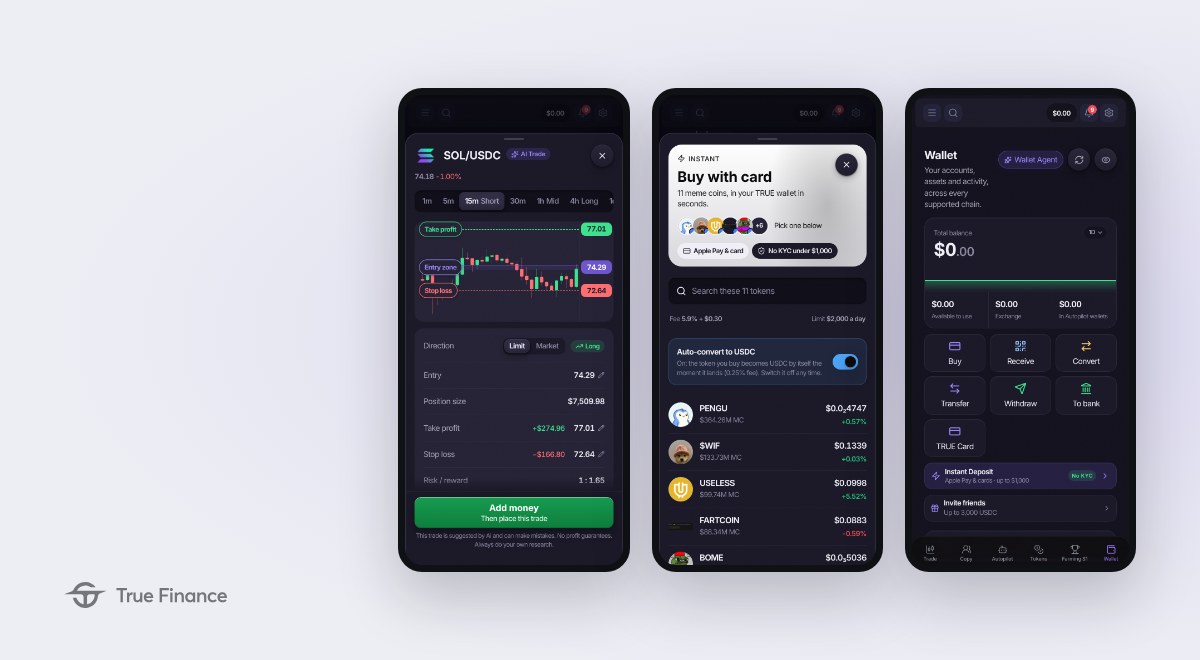
Three days after the big one, a smaller release built from what you asked for.
You can now change any value of an AI Trade before you place it. Buying tokens with Apple Pay, Visa or Mastercard is faster, and the token can turn into USDC by itself. Autopilot shows the fees on every closed trade and moves money between Autopilots in one step. The Wallet got another pass and its history has filters. Everything below is live today on the mobile app and the web app.
AI Trade: the setup is yours to change New
The AI scan draws a setup on your chart. Until now you traded it as suggested or started over by hand. Now every value is a tap away.
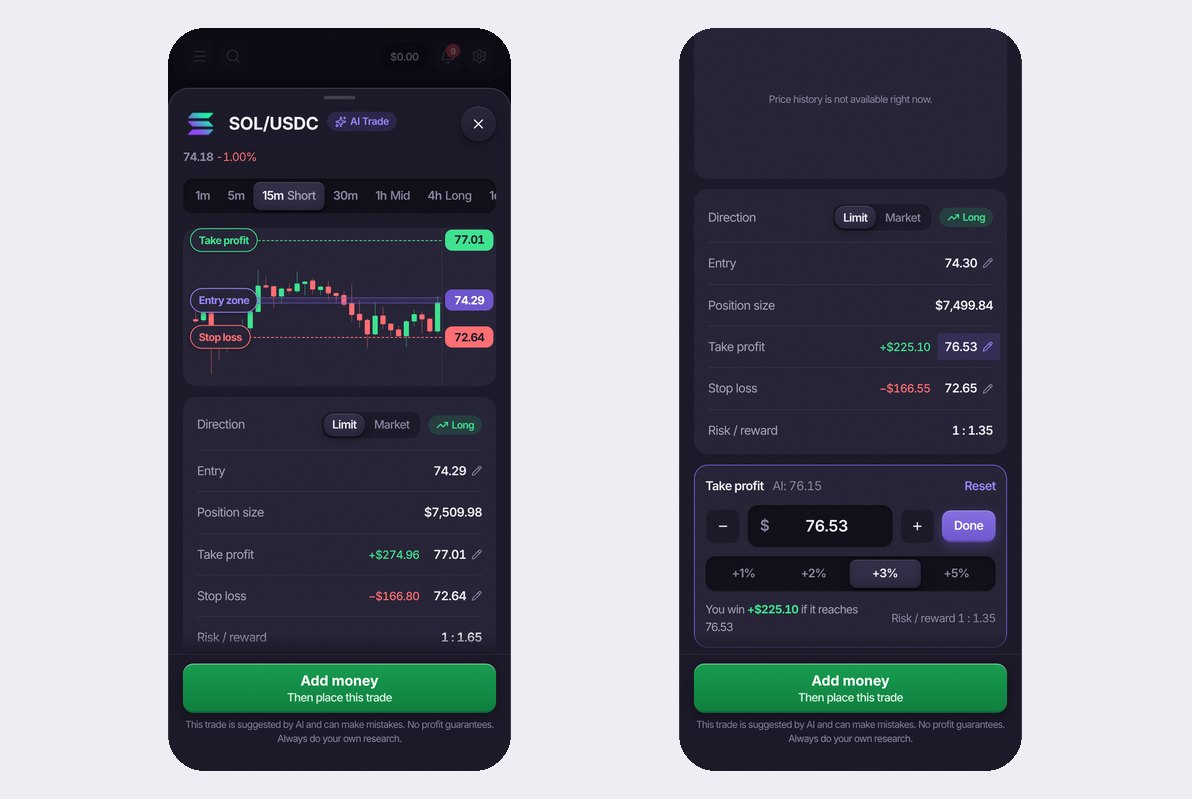
- Limit or market. The order type is a switch in the direction banner. Market opens now at the live price, Limit waits for the entry the AI drew or the one you type.
- Entry, Take profit, Stop loss, Leverage. Each value carries a pencil. Tap it and an editor opens right under the numbers: minus and plus by one tick, quick chips (plus 1, 2, 3 or 5 percent for the target, 0.5 to 3 percent for the stop), or type the price.
- You see what the change does. The win, the risk and the risk / reward update while you type. The AI's own value stays next to the field with a Reset, and one line under the numbers brings the whole setup back to the AI's.
- The same guards as the trade ticket. A stop too close to the price or a target that does not clear the fee is refused with the reason, exactly as on the normal ticket.
Buy tokens with Apple Pay, Visa or Mastercard Improved
The card checkout opens on the Wallet, picks the token, and can hand you USDC instead of the token the moment it lands.
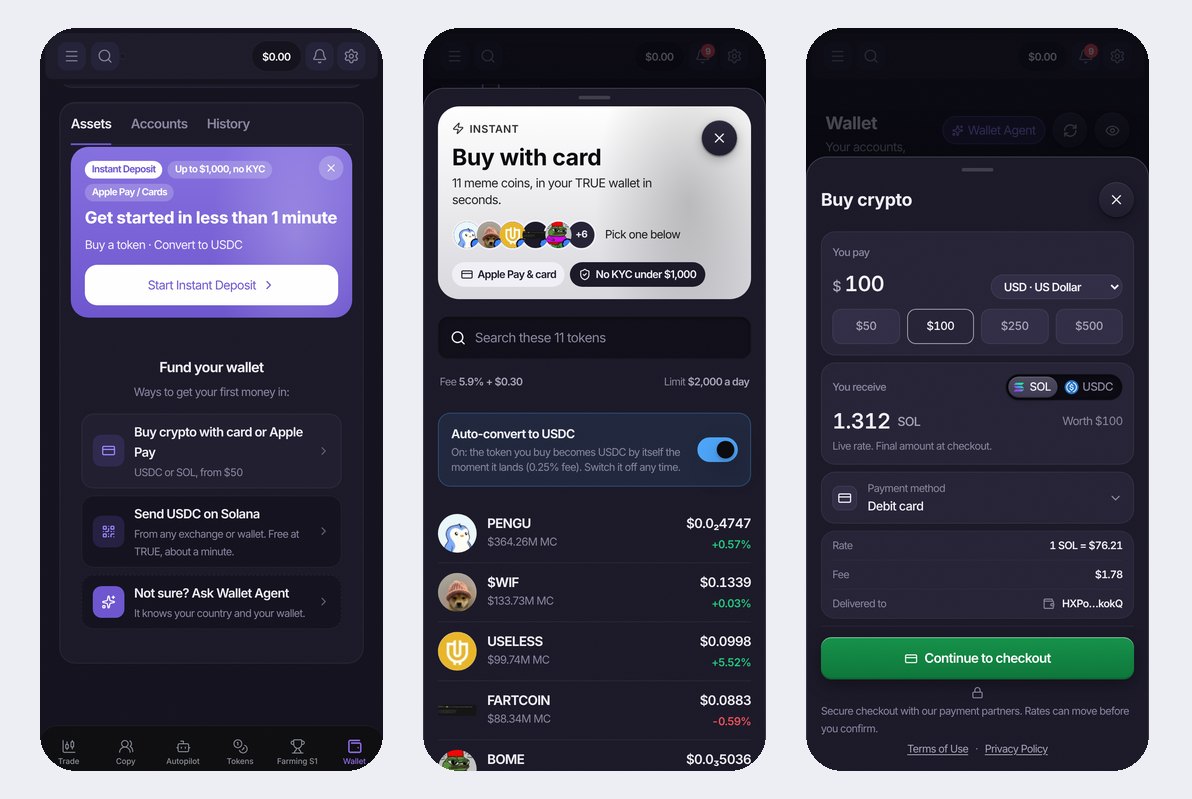
- Instant Deposit, no KYC under 1,000 dollars. One card on the Wallet opens the token checkout: 11 meme coins, Apple Pay or any Visa and Mastercard, the token lands in your TRUE wallet in seconds.
- Auto-convert to USDC. Switch it on and the token you buy becomes USDC by itself the moment it arrives (0.25 percent), ready for the Exchange, an Autopilot or a copy. Switch it off any time and keep the token.
- Buy crypto, every lane on the same amount. Card, Apple Pay and the native lanes all open on the amount you chose, and a token bought with a card now carries its entry price on the Tokens tab.
- A deposit tells you when it is in. The Wallet shows the move in flight with its status, and a push tells you the moment the money is credited.
Autopilot: fees on every closed trade, money moves in one step Improved
- The fee on every closed trade. Open a closed trade on the Autopilot page and the detail line shows what it paid in fees, next to the price and the result.
- Move money to another Autopilot. The Manage menu of a running Autopilot is grouped (Money, Settings, Control) and has Move to another Autopilot: it opens Money Management with this Autopilot as the source and another one as the destination, both changeable.
- Free to trade and Balance. The Autopilot page shows Allocated, Free to trade, In trades and Open P&L in one strip, and Balance with an explanation in the details, so you always know what the Autopilot can still use.
- Increase on one screen. Adding money to a running Autopilot is one screen again: the source shows your Funding power, the deposit is credited before the move, and a spent daily cap widens instead of stranding the money.
- Trades a day for you. Every strategy card says how many trades a day it makes for one investor, not for the whole fleet.
Wallet: three zones and a history you can filter Improved
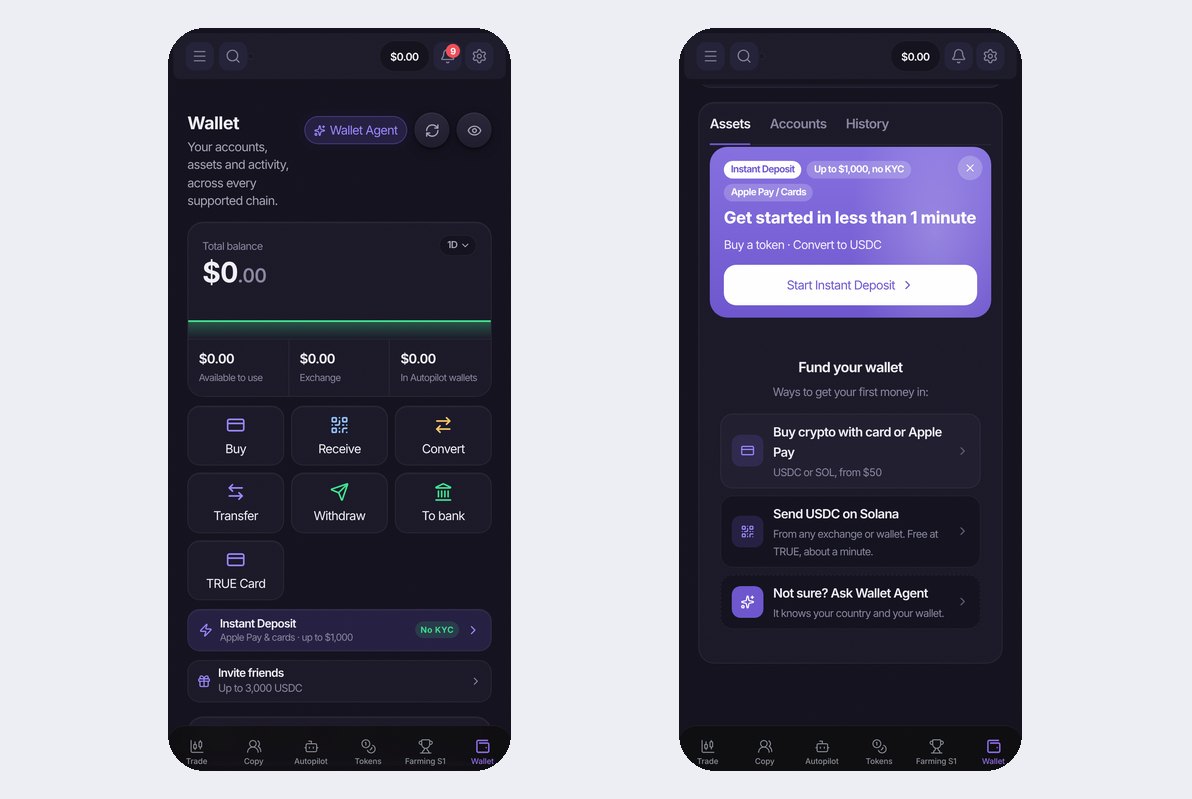
- Three zones. Assets, Accounts and History are three tabs under your balance, so the screen stays short and each list has the room it needs.
- History with filters. Deposits, withdrawals, swaps and moves between your own accounts, newest first, with filter pills for the type and the status. A move still in flight shows on the wallet until it lands.
- Add funds shows every chain. The Add funds step lists every network you can receive on, and Buy opens the buy sheet right there.
Fixed Fixed
- The confirm bar when you drag a Take profit or Stop loss line on the web chart is visible again.
- A Phantom login on the web acts as Phantom, not as the embedded wallet.
- Money Management never shows a raw error code when the wallet is short of SOL for the fee, and it offers the way out to the wallet.
- One phone, one account: a device gets pushes for the account that is signed in, never for a previous one.
- Own trades no longer read BY MIDAS after a Midas call ended.
- The launch amount of a strategy can be cleared and typed again.
- The app does less work in the background: one request per read, one refresh per push, slower polls on closed seasons. Cooler phone, longer battery.
Also in this release
The strategy library shows one card per strategy, the Autopilot home shows the community numbers on the TRUE AI card, and the welcome video on a new account starts muted with a Tap for sound. Update the app to get it all.
Built by AI, run on TRUE Exchange: perpetuals up to 50x, swaps and on-chain stocks, non-custodial, with every block on the public explorer. Your rules, your keys, your proof.