
Another huge product update: stability, security and more AI
Manage money on the Trade screen, Funding power, the new Autopilot on mobile with Ask AI and Close all, faster copy trading, 11 meme coins by card or Apple Pay, a new Wallet and a Wallet Agent. Live today on web and app.
This release touches the screens you use most, and it adds AI where it saves you the most time.
The Trade screen has a new Manage money box that switches accounts and moves money in one place. Autopilot on mobile is new from the strategy library to the agent page, with an AI you can ask about any agent and a Close all button.
Copy trading is faster, and three leaders now have more than 100 copiers. You can buy 11 meme coins with a card or Apple Pay in seconds. The Wallet is new from top to bottom, and a Wallet Agent now answers every question about funding, fees and your accounts.
Underneath, another round of stability and security work across web and app. Everything below is live today on the mobile app and the web app, for every account.
The Trade screen and Manage money Improved
Tap Manage money on the Trade screen and one box does what used to take four screens.
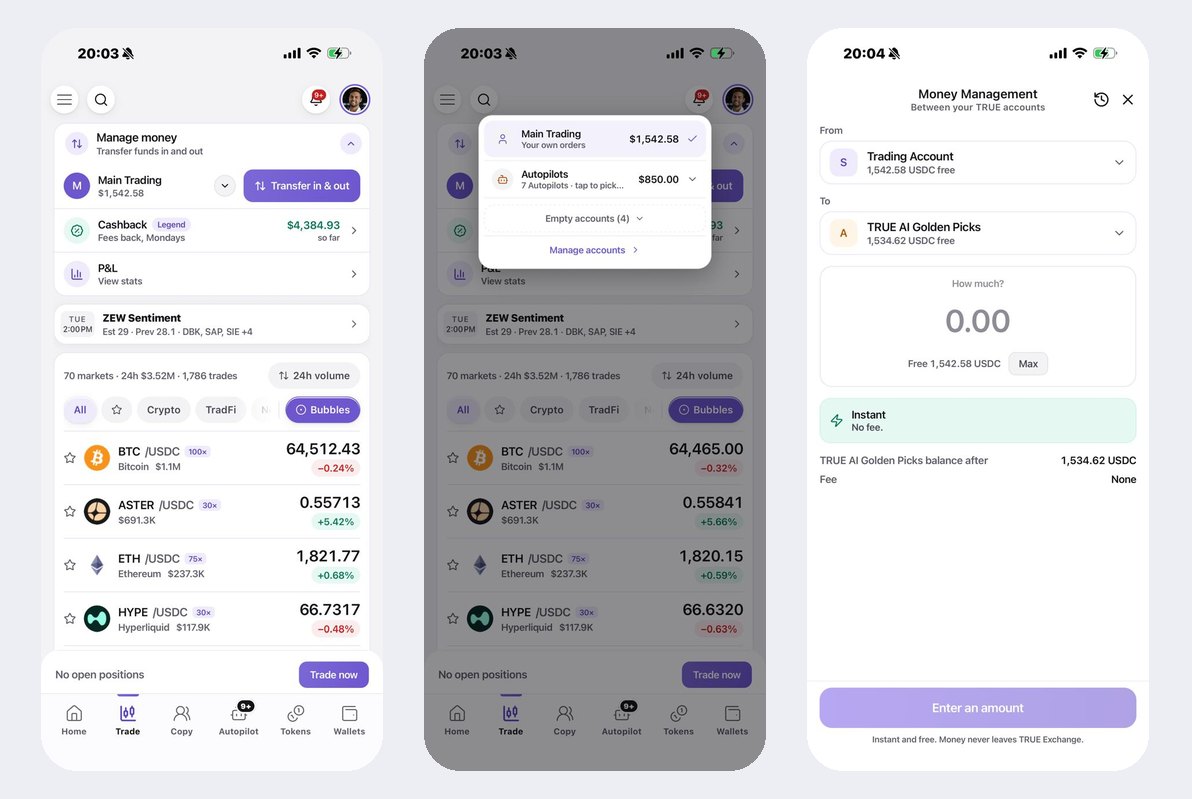
- Switch accounts in one tap. Main Trading, your Autopilots, your Copy account and every sub-account, grouped, each with its balance. Empty accounts fold away.
- Cashback and P&L one tap away. Your fee rebates with your VIP level, and your stats, open straight from the box.
- Transfer in and out, the new screen. Fund your Exchange account from your wallet, or move money between your Trading Account, your Copy account and any Autopilot. Pick where it comes from, pick where it goes, type the amount. Instant, no fee, and the money never leaves TRUE Exchange.
- A history of every move. The clock icon on the Money Management screen lists every transfer between your accounts.
Funding power New
One number for how much you can put to work right now, across your Exchange account and your spot wallet.
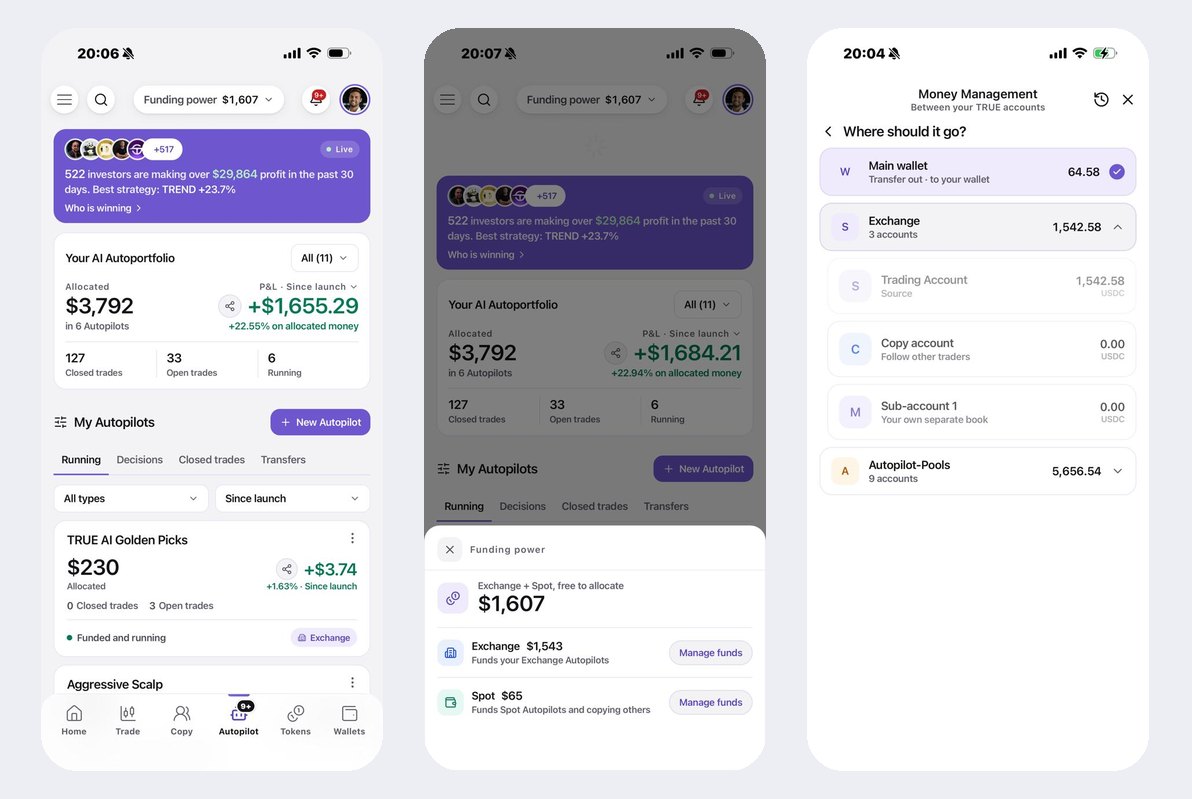
- Always in the header. Funding power sits at the top of the Autopilot tab, so you never start a setup without knowing what is free.
- Exchange and Spot, side by side. Tap it and you see what funds your Exchange Autopilots and what funds your Spot Autopilots and copies, each with its own Manage funds button.
- Move it where it is needed. Manage funds opens Money Management on that account, with the free balance already filled in.
Autopilot on mobile, rebuilt from the library up New
The whole Autopilot flow is new: the strategy library, the strategy page, the setup and the agent page. Start at the library.

- Three libraries in one. TRUE AI agents, Mine, and Community. The community view lists strategies other users built and run, with their name on them.
- Filter and sort the way you think. Last 30 days or any window, by popularity or by highest return, as a list or as cards. Every row shows the return, the money invested and how many people run it.
- Launch in one tap. Launch starts the setup on that strategy. Details opens the strategy page first.
- Who is winning. The banner at the top opens a live board of the investors and strategies that made the most in the last 30 days, closed and open profit shown separately.
Measured now: 591 Autopilots running, 1,214 started in the last 30 days.
A strategy page that explains itself New
Open any strategy and you see what it does, what it made, and you can ask.
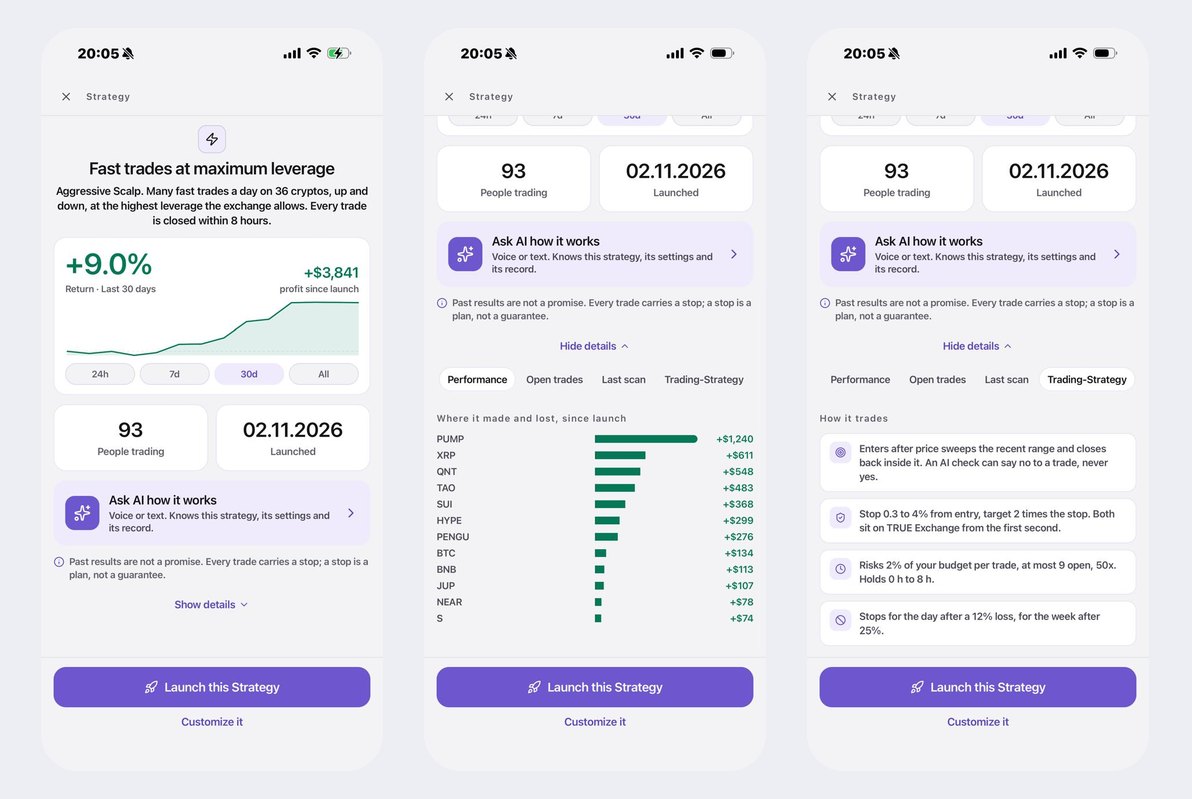
- Plain words first. "Many fast trades a day on 36 cryptos, up and down. Every trade is closed within 8 hours." Then the return, the profit since launch, how many people trade it and when it launched.
- Ask AI how it works. Voice or text. It knows this strategy, its settings and its record.
- Where it made and lost. A bar per market since launch, so you see what the strategy is good at.
- How it trades. Entry, stop and target, risk per trade, how many positions at once, when it stops for the day. Every rule in one card each.
- Launch it, or Customize it. Take the strategy as it is, or change the dials and run your own version.
The agent page, with Ask AI and Close all New
Every running Autopilot has a page that tells you everything and lets you act.
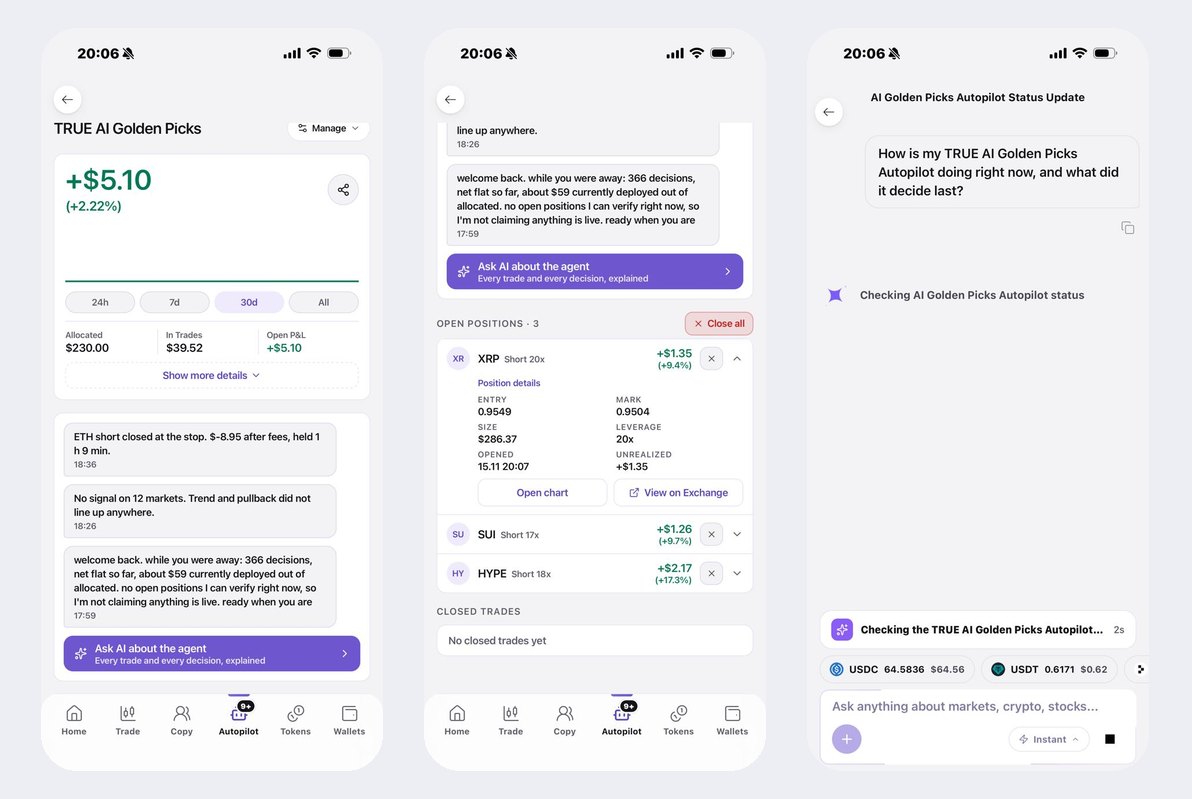
- The agent talks to you. Every decision in a feed: what it opened, what it closed and why, what it skipped. "ETH short closed at the stop. $-8.95 after fees, held 1 h 9 min."
- Ask AI about the agent. Chat about its performance, its status, what it decided last and why. Every trade and every decision, explained.
- Close all, or close one. Close every open position of an agent at once, or one at a time with the X on the row. One confirmation shows what you are closing and the open P&L.
- Every position in detail. Entry, mark, size, leverage, opened, unrealized, with Open chart and View on Exchange.
- One Manage menu. Rename, auto top up, customize this agent, pause, stop. No settings block in the way.
Copy trading Improved
The copy screen loads faster and tells you who the community is copying right now.

- Faster. The board paints at once and refreshes behind it.
- Copier counts on every trader. Win rate, open positions, 30 day profit and how many people copy them, on one row. Search across 360 traders.
Measured now: 1,606 active copy subscriptions on 218 leaders, 1,356 of them started in the last 30 days. Three leaders have more than 100 copiers; the top one has 173.
Buy 11 meme coins instantly, with a card or Apple Pay New
The fastest way into a token on TRUE. Pick one of 11 meme coins, pay with Apple Pay or a card, and it lands in your TRUE wallet.
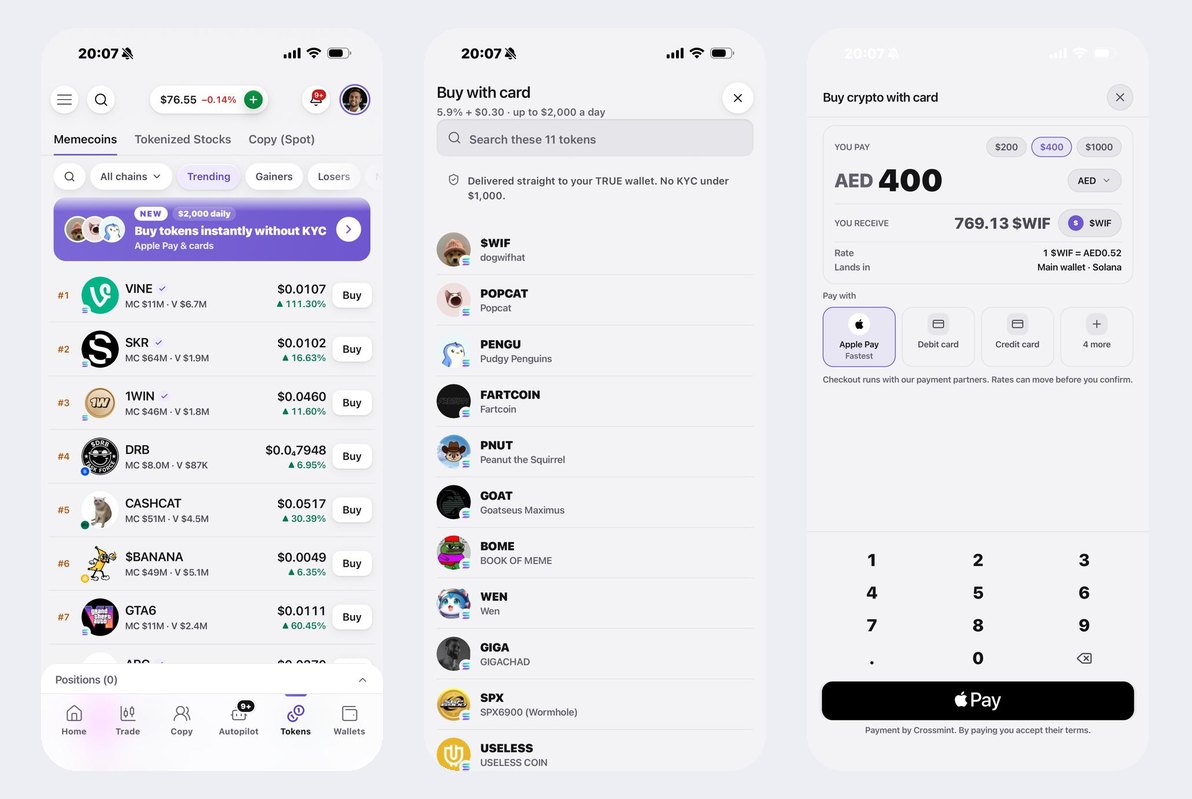
- No KYC under 1,000 USD, up to 2,000 USD a day. No documents, no questions below that line.
- Apple Pay, debit or credit card. In your own currency, with the rate shown before you pay.
- Straight into your wallet. The tokens arrive on Solana in your Main wallet. Swap them, hold them, or fund an Autopilot with them.
The Wallet, rebuilt top to bottom Improved
Every step of the Wallet is new, and it is faster.
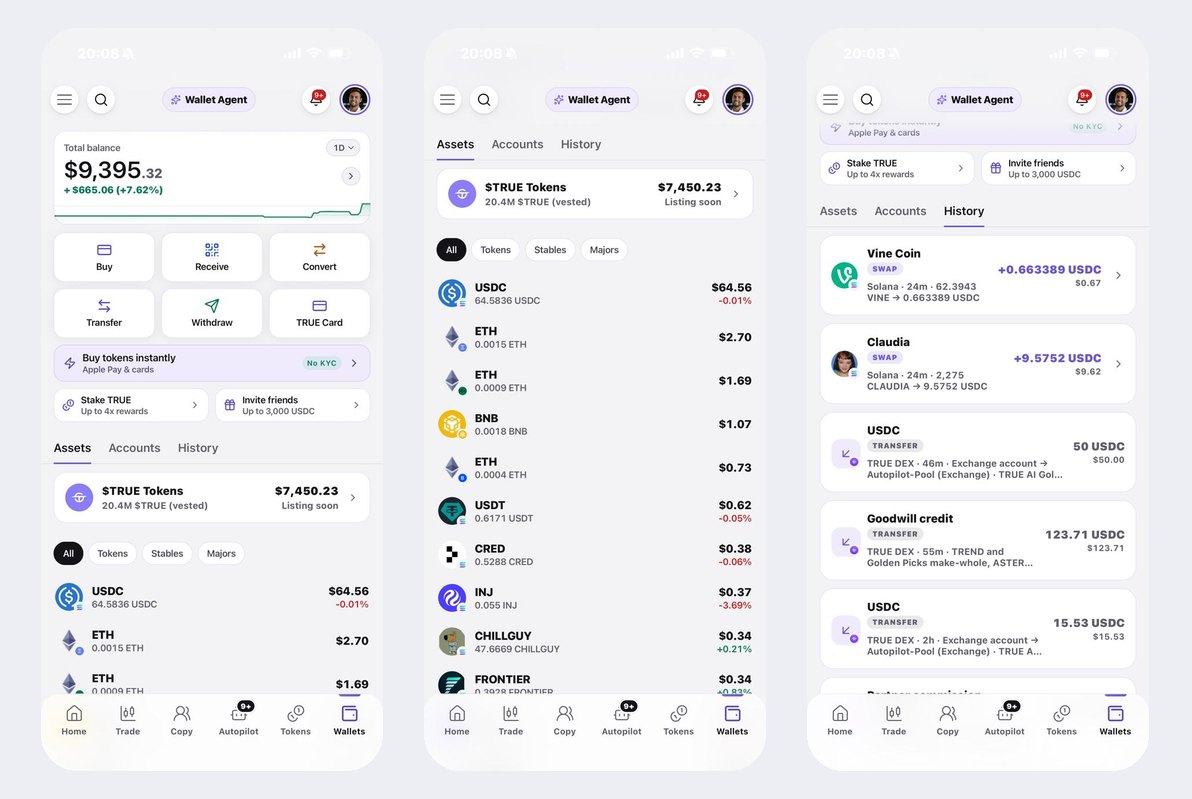
- Six actions, one grid. Buy, Receive, Convert, Transfer, Withdraw, TRUE Card. Withdraw asks where the money goes: a wallet, your bank or your card.
- Assets, Accounts, History. Three tabs. Assets filters by Tokens, Stables and Majors, with your $TRUE on top. Accounts lists every TRUE account you own, sorted the way you use them.
- History you can read. Swaps, transfers between your own accounts, credits and commissions, each with the chain, the time, the amount and where it went.
Wallet Agent, on web and in the app New
An AI that knows your wallet. It sees every account and balance you hold, your country and your wallet type, and answers in plain words.
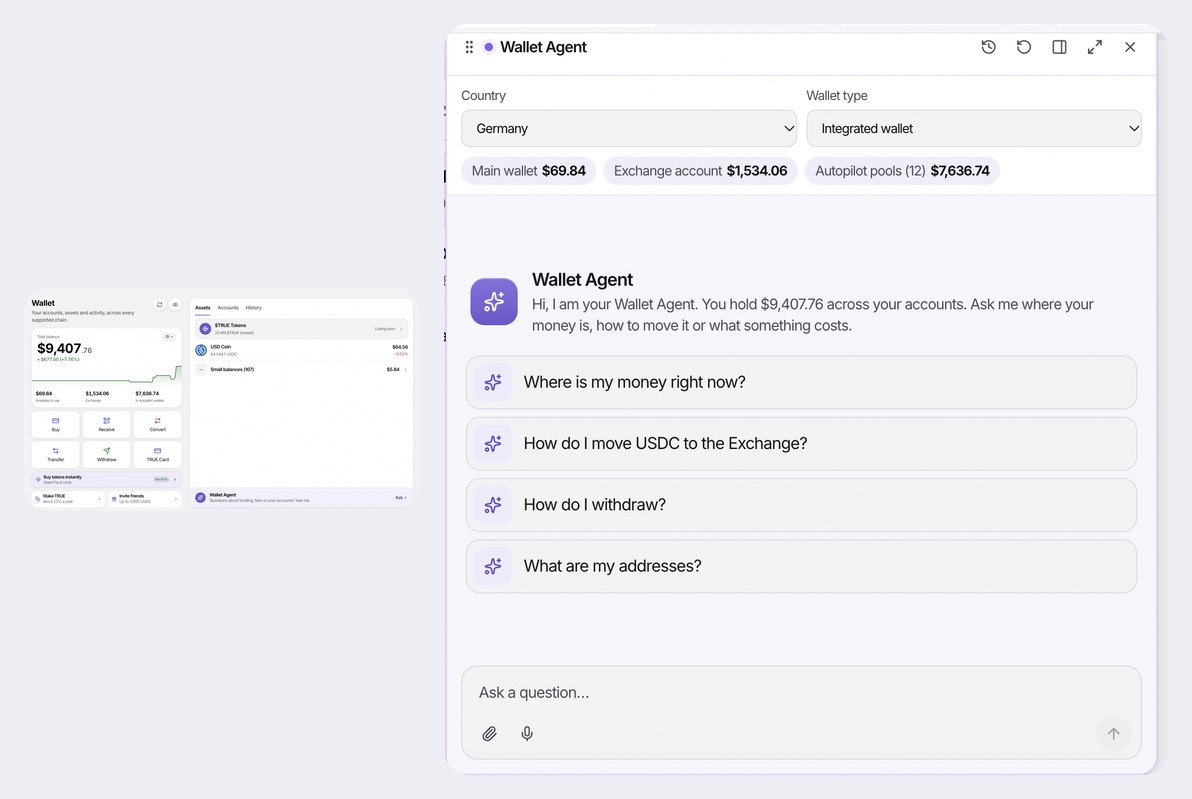
- Ask anything about funding. Where is my money right now, how do I move USDC to the Exchange, how do I withdraw, what are my addresses. It answers from your real balances.
- Knows what works in your country. It ranks the payment methods that actually complete where you are, and tells you what each one costs.
- It opens the right screen for you. When the answer is an action, the reply carries a button that opens Buy, Receive, Transfer, Withdraw or Convert. It never moves money on its own.
- More ways to pay are coming. We are adding payment methods country by country, and the Wallet Agent will show them the day they land.
Also in this release
Faster loading on every main tab, a cleaner header and side menu on the web, and dozens of fixes across web and app. Update the app to get them all.
Built by AI, run on TRUE Exchange: perpetuals up to 50x, swaps and on-chain stocks, non-custodial, with every block on the public explorer. Your rules, your keys, your proof.